
Writing with AI
Your AI assistance dial: Shape, Co-write, Direct
5 min read
Different writers want different things from an AI editor. Some want it to stay out of the way and only tidy their prose. Some want a hand drafting a tricky beat. MakeVox puts that choice in your hands with a single dial that sets how much help the AI gives. You set it per story, so a careful memoir and a fast first-draft novel can each have their own setting.
Shape: your words, made clean
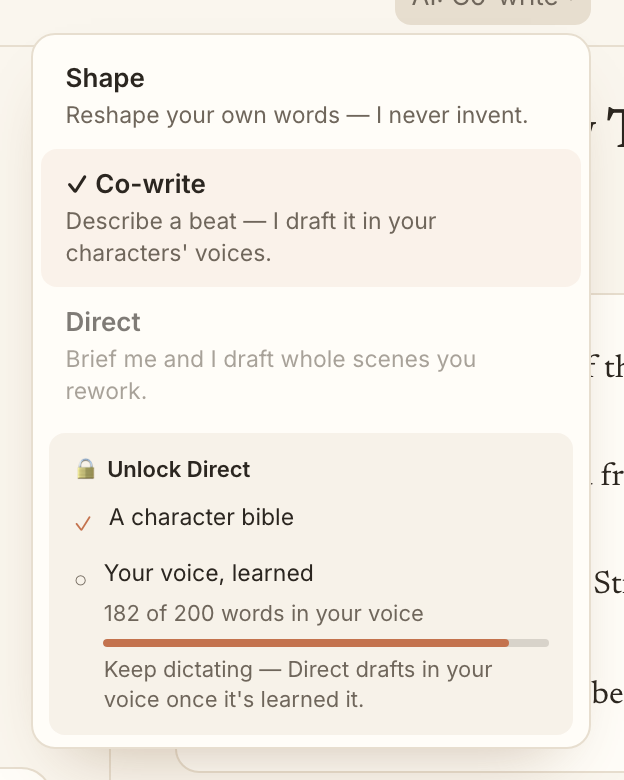
Shape is the default, and for good reason. It takes your raw dictation and turns it into clean prose using only your words. It fixes the stumbles of talking out loud without inventing sentences you did not say. The result reads like you on a good day, not like a machine wearing your name.
Tip. If you only ever use Shape, that is a feature, not a limitation. It is the setting that keeps your story most fully yours.
Co-write: describe a beat, get a draft
Co-write is for the moments you know what should happen but not how to say it. Describe the beat out loud, what changes, who feels what, where it lands, and the AI drafts that passage for you. You stay the author. You decide what to keep, rework, or throw away.
Direct: brief a whole scene
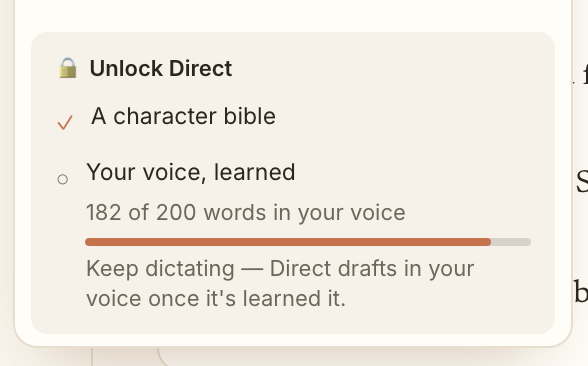
Direct is the power setting. You brief an entire scene, the way a writer might brief a collaborator, and the AI drafts it in your voice and your characters' voices. Because it is doing the most, Direct earns its way in. It unlocks once your story has enough for the AI to write like you: a character bible and a body of your own writing to learn your voice from.
How to switch
- Open a project and find the assistance dial in the workspace header (it shows the current mode, like AI: Shape).
- Click it to open the menu of Shape, Co-write, and Direct.
- Pick a mode. The change saves to that project right away.
- If Direct is locked, the menu shows a short checklist of what is left to unlock it.
Why Shape is the default
MakeVox starts every story in Shape on purpose. The promise of the app is your voice, not a generated imitation of it. Starting in Shape means your story is yours from the first word, and you reach for more help only when you actually want it.
Keep reading
Your words, scored: Voice-Fidelity and the Provenance X-ray
See how much of any passage is genuinely yours. The Voice-Fidelity meter scores it, the Provenance X-ray shows it line by line, and a toggle keeps it your words only.
Build your character bible
Your character bible is the AI's memory of who your people are. Write it or dictate it, and together with your prose it unlocks the Direct setting.